_cropped.jpg)
Business cards have been a networking staple for a long time, allowing people to share their contact details. However, traditional paper cards have their limits. They can only hold so much information, and manually typing a phone number or email into your phone can be slow and prone to errors.
This is where technology comes in. A QR code business card bridges the gap between the physical and digital worlds. By adding this special square code to your card, you make it incredibly easy for others to save your details instantly.
This guide will teach you everything you need to know about these cards. We will explain what they are and how they work. We will also show you how to make one for free. This guide is perfect for beginners who want to improve how they network with others.
What Is a QR Code Business Card?
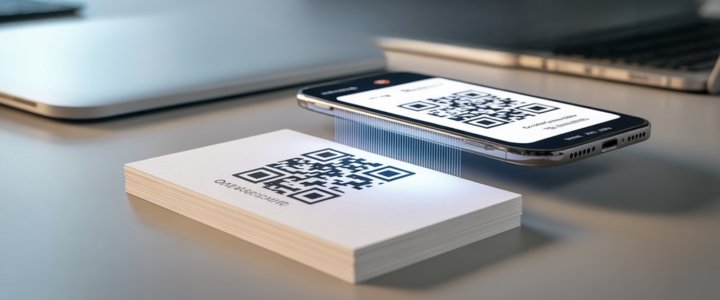
A QR code business card is just like a normal business card but with a special addition. It has a Quick Response code printed on it. A Quick Response code is a square box filled with black and white patterns. This pattern holds digital information inside it.
The main difference between a normal paper card and a card with a QR code is what happens after you give it to someone. With a normal card, the person must read the text and type it into their phone manually. This takes time and sometimes people make typing mistakes. With qr code business cards, the process is much faster.
It works very simply. The person takes out their smartphone and opens the camera app. They point the camera at the square code on your card. The phone reads the pattern instantly. Then a notification pops up on their screen. When they tap it, your information appears automatically.
There are two main ways people use this technology. Some people print the code on a physical paper card. Others use a fully digital business card that lives only on their phone screen. Both ways use the same technology to share information quickly.
Why You Should Use a QR Code on Business Cards?
There are many good reasons to put a qr code on business cards. It makes networking smoother and more impressive. Here are the main benefits.
Easy Contact Saving
The biggest benefit is speed. A special type of code called a vCard QR code lets people save your contact details with one click. They scan the code and your name, number, and email appear on their screen. They just press "Save" and they are done. They do not have to type anything. This means they are more likely to contact you later because it was so easy to save your number.
Show More Information
A paper card has very limited space. You can usually only fit your name and a few lines of text. If you try to add more, it looks messy. Business cards with qr code technology solve this space issue. The code can link to huge amounts of digital information. It can send people to your full website or a video introduction. It can even link to a digital file like a brochure or menu. The card stays clean and simple, but the code opens a door to much more content.
Track Your Success
Traditional cards are hard to track. You hand them out, but you do not know if people actually look at your website later. Some advanced QR codes allow you to track data. These are called dynamic codes. They can tell you how many people scanned your card. This helps you understand if your networking is working well.
Update Anytime
Imagine you print five hundred business cards. A week later, your phone number changes. With normal cards, you have to throw them all away and print new ones. This wastes money and paper. If you use a dynamic QR code, you do not have to reprint. You can log into a website and change the phone number that the code links to. The printed code stays the same, but the information it shows gets updated. This is very useful for scannable business cards.
What Information Can You Link To?
You can link to almost anything digital. Here are the most popular options for a custom qr code business card.
Contact Details (vCard)
This is the most common use. A vCard is a digital file that holds contact information. When you link your code to a vCard, it shares your full name and phone number. It also shares your email address and job title. It can even include your company name and address. This ensures all your details go directly into the other persons address book.
Website and Landing Pages
You can direct people to your company homepage. This is great for driving traffic to your business. You can also link to a special offer page. For example, a restaurant owner could link to a coupon page. A real estate agent could link to a specific house listing.
Social Media Profiles
Many people prefer to connect on social media. You can link your code to your LinkedIn profile. This is very professional for business. You could also link to an Instagram or Facebook page. This is good for artists or shops that want to show visual content.
Portfolios and Works
If you are a photographer or designer, you need to show your work. A paper card cannot show a gallery of photos. A qr code business card design can link directly to your online portfolio. The person scans the card and immediately sees your best projects.
Google Maps Location
If you have a physical store or office, you want people to find you easily. You can link your code to a Google Maps location. When they scan the card, their phone opens the maps app and gives them directions to your door.
Static vs Dynamic QR Codes
Before you create your card, you must choose the right type of code. There are two types.
Static QR Code
A static QR code holds information directly in the pattern. Because the data is fixed in the pattern, it cannot be changed once printed. If you make a spelling mistake or change your email, the code stops working correctly. You would need to print new cards. The good news is that static codes are usually free to make. They also last forever and do not expire.
Dynamic QR Code
A dynamic QR code is smarter. It does not hold the information directly. Instead, it holds a short link that redirects to your information. Because of this, you can change the destination later. You can update your phone number or website link without reprinting the card. This type often costs money and requires a subscription.
Recommendation
For a beginner who just wants a simple link to a personal website, a static code is fine. However, for a business professional, a dynamic code is much better. The ability to update information saves money in the long run. It is the smarter choice for professional qr code business cards.
How to Create a QR Code Business Card?
Making your own card is easier than you think. You do not need to be a computer expert. Follow these simple steps.
Step 1: Choose a Generator
First, you need a tool to make the code. There are many websites that do this. Canva is a very popular design tool that has a QR maker built inside it. Adobe Express is another good option. There are also specialized QR generator websites that focus only on codes.
Step 2: Select Content
Next, decide what you want the code to do. Do you want to share a vCard with your contacts? Do you want to link to your website? Choose the option that helps your networking goals the most.
Step 3: Customize the Look
Now you can make the code look nice. A custom qr code business card looks better than a plain black and white one. You can often change the color of the dots. You can also change the shape of the corners. Some tools let you put your company logo in the very middle of the code. This helps with branding.
Step 4: Download the Code
Once you are happy with the design, you need to save the file. The best file formats are PNG or SVG. These formats keep the lines sharp and clear. This is very important for printing. If the image is blurry, phones will not be able to scan it.
Step 5: Add to Design
Finally, you need to put the code onto your card design. You can use a design tool like Canva for this. Upload the image file you just saved. Drag it onto your business card layout. Make sure it fits well with your text and logo.
Design Best Practices for Scannable Business Cards
A pretty card is useless if it does not work. You must follow some design rules to make sure your scannable business cards work every time.
Size Matters
Do not make the code too small. If it is tiny, smartphone cameras cannot see the details. The minimum size should be around 2 x 2 centimeters. Usually, bigger is better. If you have space, make it a little larger to be safe.
Contrast is Key
Contrast means the difference between light and dark colors. Cameras read QR codes by seeing the contrast between the dots and the background. The best combination is black dots on a white background. You can use other dark colors like deep blue or dark red. However, avoid using light yellow on white. The camera will struggle to see the pattern.
Leave Some Space
You must leave empty space around the code. This is called the quiet zone. It is a border of white space that separates the code from other designs. If you put text or pictures too close to the code, the camera gets confused. It needs that clear border to recognize where the code starts and ends.
Call to Action
People need to know what to do. Sometimes people do not realize they should scan the card. Add a small text instruction near the code. You can write something simple like "Scan to Save Contact" or "Scan for Portfolio". This encourages people to take action.
Test Before Printing
This is the most important rule. Always test your code before you print five hundred copies. Print one copy on your home printer first. Scan it with an iPhone. Then scan it with an Android phone. Make sure it works perfectly on different devices. This prevents expensive mistakes.
Common Mistakes to Avoid
There are some common errors that beginners make with qr code business card design. Knowing them helps you avoid failure.
Code Too Small
We mentioned size before but it is worth repeating. Making the code tiny is the number one reason they fail. Designers sometimes shrink the code to fit more text. This ruins the functionality.
Broken Links
If you use a static code for a website link, be careful. If that website page gets deleted later, your card becomes useless. The code will scan, but it will lead to an error page. Always check your links regularly.
Too Much Design
It is fun to be creative. However, putting too many pictures or patterns over the code breaks it. Do not put a large image on top of the data dots. Keep the code area clean and simple.
Using Low Quality Images
Do not use a blurry or pixelated image of your code. If the edges of the squares are fuzzy, the camera cannot read them. Always use high quality files when you print.
Tools You Can Use
You have many choices for creating your card. Here are three good options.
Canva
Canva is great for beginners. It is easy to use and has many templates. It has a built-in QR maker so you do not need to leave the website. You can design the whole card and add the code in one place.
Adobe Express
Adobe Express is good for professional templates. It offers very high quality designs. It is useful if you want your card to look very polished and modern.
Free Online Generators
There are many free generator websites. Search for "free QR code generator" on Google. They are quick and easy. However, be careful. Some free tools put advertisements on your link. Others might make the code expire after a few weeks. Always read the details before using a free tool for business.
Conclusion
QR code business cards are a smart upgrade for anyone in business. They combine the tradition of paper cards with the power of digital technology. They make it easy for people to save your contact details. They also allow you to share much more information than a small piece of paper allows.
You do not need to be a tech expert to use them. By following the steps in this guide, you can create a custom qr code business card today. Remember to choose the right type of code for your needs. Keep the design simple and always test it before printing.
Why not try making a simple test card right now? It takes only a few minutes. This small change can make a big impression on the people you meet.
FAQs
How do I scan a QR code business card?
It is very simple. Open the camera app on your smartphone. Point the camera at the square code. Hold it steady for a second. A link will pop up on your screen. Tap that link to see the information.
Are QR codes on business cards a good idea?
Yes, they are a very good idea. They bridge the gap between paper and digital. They make it easier for people to contact you. They also show that you are modern and professional.
Do QR codes cost money?
Static codes are usually free to make. Dynamic codes often have a monthly fee because they offer advanced features like editing and tracking.
What is the lifespan of a QR code business card?
Static codes last forever as long as the link works. Dynamic codes last as long as you pay for the service subscription.
Which QR code is best for a business card?
A vCard is best if you want to share contact details like phone numbers. A URL code is best if you want to send people to your website or portfolio.