_cropped.jpg)
Have you ever tried to type a long phone number from a paper card? It is very annoying. You look at the card and then look at your phone. You type one number and look back at the card. It is easy to make a mistake. If you type the wrong email address your message will not go through.
There is a modern solution to this problem. It is called business cards with qr code. These cards make sharing your details very fast and simple. You do not need to type anything. You only need to use your camera.
This blog will teach you everything about these special cards. You will learn how to make them and how to use them. You will see why they are better than old paper cards. QR code business cards help you connect with people faster. They also make you look very professional and smart.
What are Business Cards with QR Code?
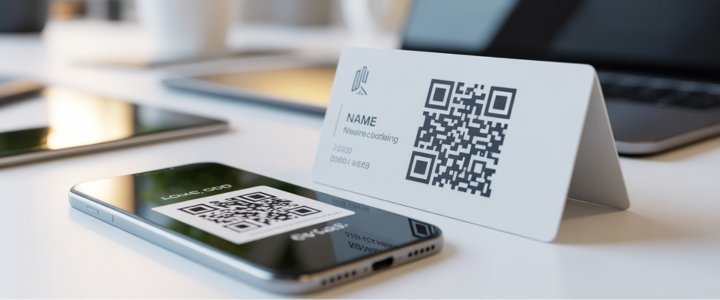
A qr code business card looks like a normal business card. It has your name and your job title. It has your company logo. But it also has something special. It has a square box with a strange pattern inside it. This square box is the QR code.
QR stands for Quick Response. When a person points their phone camera at this box the phone reads the pattern. It works like magic. The phone creates a bridge between the paper card and the digital world. It takes the person from the physical card to a website or a contact list on the phone.
Business cards with qr code are becoming very popular in 2024. This is because almost everyone has a smartphone now. People do not want to carry many paper cards in their pockets. They want to save information on their phones quickly. These cards help them do that.
The Difference Between Static and Dynamic QR Codes
It is important to know that there are two main types of codes. You must choose the right one for your custom business cards with qr code. The two types are static codes and dynamic codes.
Static QR Codes
A static QR code is fixed. Once you make it you cannot change it. The information is locked inside the pattern of the code. If you print 500 cards with a static code they will always go to the same link. This is a problem if you change your website address. You would have to throw away all your old cards. You would have to print new ones.
Dynamic QR Codes
A dynamic QR code is changeable. This is the best choice for business cards. The pattern on the card sends the phone to a special short link first. Then that short link goes to your website. You can change where the short link goes at any time.
Imagine you get a new phone number. With a dynamic code you do not need to print new cards. You just log in to your account and update the number. The old cards will still work perfectly. This saves you money and time. Dynamic codes are the smart choice for qr code business card ideas.
What Information a QR Code Can Share?
You can put many different things inside a qr code business card. It is much more powerful than a plain paper card. Here are the most common things you can link to.
Website Link
This is the most popular use. When someone scans the card their phone opens your company website. They can read about your services immediately. They do not need to type www dot anything.
Contact Details (vCard)
This is very helpful for networking. The code contains a file called a vCard. When the person scans it their phone asks a question. It asks if they want to save your contact. If they click yes your name and number and email are saved instantly. They do not have to type a single letter.
Social Media Profile
You can link the code to your LinkedIn profile. You can also link it to your Instagram page or Facebook page. This helps people follow you online. It helps you grow your network on the internet.
Menu or Portfolio
Artists and photographers love this feature. A painter can link to a digital gallery of their art. A restaurant owner can link to the food menu. This lets you show your work even if the card is small.
Google Maps Location
If you have a shop or an office you want people to visit you. You can link the code to Google Maps. When they scan it their phone opens the map app. It shows them exactly how to drive to your front door.
Different Types of QR Code Business Cards
There are many ways to make these cards. You can choose the style that fits your job.
Printed Business Cards
These are standard paper cards. They feel like normal cards but they have a code printed on them. They are cheap and easy to make. You can hand them out at meetings.
Digital Business Cards
These are not paper at all. They live on your phone screen. You show your phone to another person. They scan your screen with their phone. This is good for the environment because you do not use paper.
Metal QR Code Business Cards
These cards are very fancy. They are made of steel or metal. They are heavy and durable. They do not bend or tear. A metal card shows that you are very serious about your business. It leaves a strong impression.
QR Code Business Card with Photo
Some people like to put their picture on the card. This helps people remember your face. You can put your photo on the left side and the code on the right side. This builds trust with new clients.
QR Code on Back of Business Card
Sometimes the front of the card is full of text. It might look messy if you add a code too. A good idea is to put the qr code on business cards on the back side. You can make the code very big on the back. This makes it easy to scan.
Business Card Design with QR Code
Designing your card is fun. You need to make sure the card looks good and works well. Here is how to plan your business card design with qr code.
Using Canva
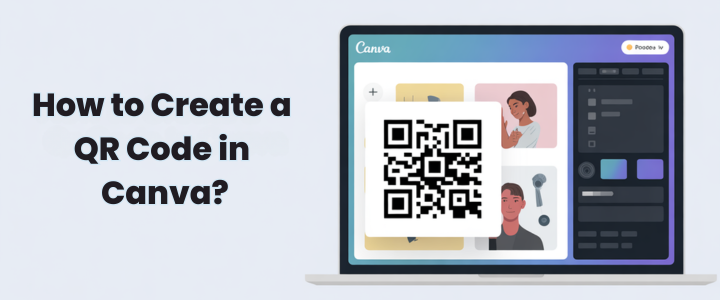
Canva is a free website for design. It is very easy to use. You can search for a qr code business card template. They have thousands of designs ready for you. You just change the name and the colors.
Using Adobe Express
Adobe Express is another good tool. It helps you generate the code and place it on the card. It has tools for professional designers too.
Custom Design
If you want something very unique you can hire a designer. A professional designer can give you great qr code business card ideas. They can make a card that matches your brand perfectly.
Colors and Logos
You can make the code match your company colors. You can even put a small logo in the middle of the code. But be careful. If the logo is too big the camera cannot read the pattern. You must make sure the contrast is high. A black code on white paper is the easiest to read.
Clear Call to Action
People need to know what to do. You should put some text near the code. You can write "Scan Me" or "Visit Website". This tells the person why they should use their phone.
How to Print Custom Business Cards with QR Code?
Printing is the final step. You want your qr code business cards to look crisp and clean.
Paper Quality
Choose good paper. Thin paper can wrinkle. If the paper wrinkles the code might not work. Thick paper or glossy paper is better. It lasts longer in a wallet.
Size and Placement
The size of the code is very important. If it is too small the camera will not see it. The code should be at least 2 centimeters by 2 centimeters. Do not place the code near the edge of the card. The printer might cut it off.
Vistaprint and Bulk Printing
Websites like Vistaprint are good for printing many cards at once. They allow you to upload your design. They have options for custom business cards with qr code. You can order 100 or 500 cards for a low price.
Test Before Print
This is the most important rule. You must print one copy at home first. Scan it with your phone. Does it work? Does it go to the right website? Always check your business card examples with qr code before you pay for 500 copies.
Same Day Printing
If you need cards for a meeting tomorrow look for local shops. Many local print shops offer same day printing. This is helpful if you run out of cards suddenly.
Is a QR Code on Business Card Good or Bad?
You might wonder if you should use this technology. Let us look at if a qr code on business card good or bad.
Benefits
It is fast and easy for your customers. It shows that you are modern and understand technology. It holds much more data than a small paper card. A paper card only holds text. A code holds a whole website.
Downsides
Some older people might not know how to scan it. They might prefer a phone number they can read. The code takes up space on the design. If you use a free service and the link breaks the card becomes useless.
Tracking and Analytics for Your Cards
There is another great benefit to digital codes. You can track them. This means you can count how many people scan your card.
If you hand out 100 cards and 50 people scan them you know your networking is good. If only 1 person scans it you might need to change your design. This helps business owners understand their customers.
To use this feature you usually need a dynamic code. Most dynamic code services cost a small amount of money. But the data they give you is very valuable for your business growth.
Best Practices for Scanning and Security
You want your customers to be safe. You also want them to have an easy experience. Follow these tips.
Safe Links
Only link to secure websites. Your website should start with HTTPS. This keeps your customer's data safe. Do not link to suspicious websites.
Avoid Broken Links
Check your link every month. If your website changes the link might stop working. A broken link looks very unprofessional. It makes people think you are not careful.
Making it Easy to Scan
Leave some empty space around the code. This is called white space or quiet zone. If text or pictures are touching the code the camera gets confused.
Smartphone Experience
Make sure your website looks good on a phone. When people scan the card they are using a mobile phone. If your website is only for desktop computers it will be hard to read.
Conclusion
Business cards with qr code are a smart choice for growth. They combine the physical world with the digital world. They make networking faster and easier for everyone.
Remember to check your business card examples with qr code carefully. Test the code to make sure it works. Choose a dynamic code if you want to update your info later.
You should start designing your custom business cards with qr code today. It is a small change that can make a big difference for your business. Visit a design website now to view a specific qr code business card template and get started.
FAQs
Can I put a QR code on my business card?
Yes it is very easy and often free to do. You can use many online tools to make one in minutes.
Do I need a business registration to use business cards?
No you can use them as a freelancer or student too. Anyone can use a card to share their contact info.
What is the downside of QR codes?
They need good lighting and a smartphone to work. If it is very dark the camera cannot see the code.
Are there free QR code business cards?
Yes many websites let you make the design for free. You only pay when you print them on paper.